Creating a Smarter Activity Log
A purpose-built workflow for operations teams to capture daily activity fast and accurately.
*Some details in this case study have been changed or omitted to comply with my confidentiality obligations. All sensitive or proprietary information has been fully obfuscated.
Creating a Smarter Activity Log
A purpose-built workflow for operations teams to capture daily activity fast and accurately.
*Some details in this case study have been changed or omitted to comply with my confidentiality obligations. All sensitive or proprietary information has been fully obfuscated.
Creating a Smarter Activity Log
A purpose-built workflow for operations teams to capture daily activity fast and accurately.
*Some details in this case study have been changed or omitted to comply with my confidentiality obligations. All sensitive or proprietary information has been fully obfuscated.
Project Overview
At Kido, our design team partnered closely with the client’s VP of Product and engineering teams to create FlowTrack’s Activity Log from the ground up - turning a slow, fragmented workflow into a faster, clearer, and more structured everyday tool for employees and managers.
Kido - strategic design operations partner
Ido Zaifman
FlowTrack - a logistics management platform
Product Design
Product Designer
2024
Product & Strategy
UX & Research
UI & Interaction Design
Handoff & Delivery
Prototyping
Project Overview
At Kido, our design team partnered closely with the client’s VP of Product and engineering teams to create FlowTrack’s Activity Log from the ground up - turning a slow, fragmented workflow into a faster, clearer, and more structured everyday tool for employees and managers.
Kido - strategic design operations partner
Ido Zaifman
FlowTrack - a logistics management platform
Product Design
Product Designer
2024
Product & Strategy
UX & Research
UI & Interaction Design
Handoff & Delivery
Prototyping
Project Overview
At Kido, our design team partnered closely with the client’s VP of Product and engineering teams to create FlowTrack’s Activity Log from the ground up - turning a slow, fragmented workflow into a faster, clearer, and more structured everyday tool for employees and managers.
Kido - strategic design operations partner
Ido Zaifman
FlowTrack - a logistics management platform
Product Design
Product Designer
2024
Product & Strategy
UX & Research
UI & Interaction Design
Handoff & Delivery
Prototyping
The Challenge
FlowTrack is a B2B SaaS platform used by mid-size companies to manage logistics operational tasks, compliance, risks and daily activity logs.
In this industry, daily activity logs are largely still kept in physical logbooks, requiring employees to spend a significant amount of time daily manually recording their work and status updates. Managers faced inconsistent entries, duplicates, missing information, and had almost no visibility into updates or corrections.
To solve this, the company initiated a redesign of the Daily Activity Log experience to improve speed, accuracy, standardization, and manager oversight. Kido was brought in to lead this redesign and help streamline the end-to-end experience.
The Challenge
FlowTrack is a B2B SaaS platform used by mid-size companies to manage logistics operational tasks, compliance, risks and daily activity logs.
In this industry, daily activity logs are largely still kept in physical logbooks, requiring employees to spend a significant amount of time daily manually recording their work and status updates. Managers faced inconsistent entries, duplicates, missing information, and had almost no visibility into updates or corrections.
To solve this, the company initiated a redesign of the Daily Activity Log experience to improve speed, accuracy, standardization, and manager oversight. Kido was brought in to lead this redesign and help streamline the end-to-end experience.
The Challenge
FlowTrack is a B2B SaaS platform used by mid-size companies to manage logistics operational tasks, compliance, risks and daily activity logs.
In this industry, daily activity logs are largely still kept in physical logbooks, requiring employees to spend a significant amount of time daily manually recording their work and status updates. Managers faced inconsistent entries, duplicates, missing information, and had almost no visibility into updates or corrections.
To solve this, the company initiated a redesign of the Daily Activity Log experience to improve speed, accuracy, standardization, and manager oversight. Kido was brought in to lead this redesign and help streamline the end-to-end experience.
My Role
As the primary hands-on designer on this project, I collaborated closely with the client R&D and Product teams to reshape the Logbooks experience. I led the execution of the UX work - conducting research, mapping workflows, defining personas, and identifying their pain points - while partnering with product, engineering, and domain experts to ensure alignment throughout the process. I worked under the guidance of my managers, who provided strategic oversight and reviewed key design decisions, helping refine the direction and strengthen the impact of the solutions.
My Role
As the primary hands-on designer on this project, I collaborated closely with the client R&D and Product teams to reshape the Logbooks experience. I led the execution of the UX work - conducting research, mapping workflows, defining personas, and identifying their pain points - while partnering with product, engineering, and domain experts to ensure alignment throughout the process. I worked under the guidance of my managers, who provided strategic oversight and reviewed key design decisions, helping refine the direction and strengthen the impact of the solutions.
My Role
As the primary hands-on designer on this project, I collaborated closely with the client R&D and Product teams to reshape the Logbooks experience. I led the execution of the UX work - conducting research, mapping workflows, defining personas, and identifying their pain points - while partnering with product, engineering, and domain experts to ensure alignment throughout the process. I worked under the guidance of my managers, who provided strategic oversight and reviewed key design decisions, helping refine the direction and strengthen the impact of the solutions.
Discovery & Research
Using interviews, workflow analysis, and data insights, we clarified our primary personas and identified the friction points each one encountered in the existing experience.
Employee Pain Points
Spending significant time daily writing logs by hand
Repetitive entries that could be automated
Confusing organization of sections and fields
No way to track errors or corrections easily
Limited mobility - field teams had to carry logbooks everywhere
Manager Pain Points
Inconsistent formats and missing information across teams
No visibility into who recorded or updated entries
Hard to compare data across teams or time periods
Manual consolidation of data took hours
Business Impact
High potential for errors and compliance issues
Adoption was inconsistent - some employees skipped or delayed logging
Managers spent significant time manually compiling and verifying logs
Discovery & Research
Using interviews, workflow analysis, and data insights, we clarified our primary personas and identified the friction points each one encountered in the existing experience.
Employee Pain Points
Spending significant time daily writing logs by hand
Repetitive entries that could be automated
Confusing organization of sections and fields
No way to track errors or corrections easily
Limited mobility - field teams had to carry logbooks everywhere
Manager Pain Points
Inconsistent formats and missing information across teams
No visibility into who recorded or updated entries
Hard to compare data across teams or time periods
Manual consolidation of data took hours
Business Impact
High potential for errors and compliance issues
Adoption was inconsistent - some employees skipped or delayed logging
Managers spent significant time manually compiling and verifying logs
Discovery & Research
Using interviews, workflow analysis, and data insights, we clarified our primary personas and identified the friction points each one encountered in the existing experience.
Employee Pain Points
Spending significant time daily writing logs by hand
Repetitive entries that could be automated
Confusing organization of sections and fields
No way to track errors or corrections easily
Limited mobility - field teams had to carry logbooks everywhere
Manager Pain Points
Inconsistent formats and missing information across teams
No visibility into who recorded or updated entries
Hard to compare data across teams or time periods
Manual consolidation of data took hours
Business Impact
High potential for errors and compliance issues
Adoption was inconsistent - some employees skipped or delayed logging
Managers spent significant time manually compiling and verifying logs
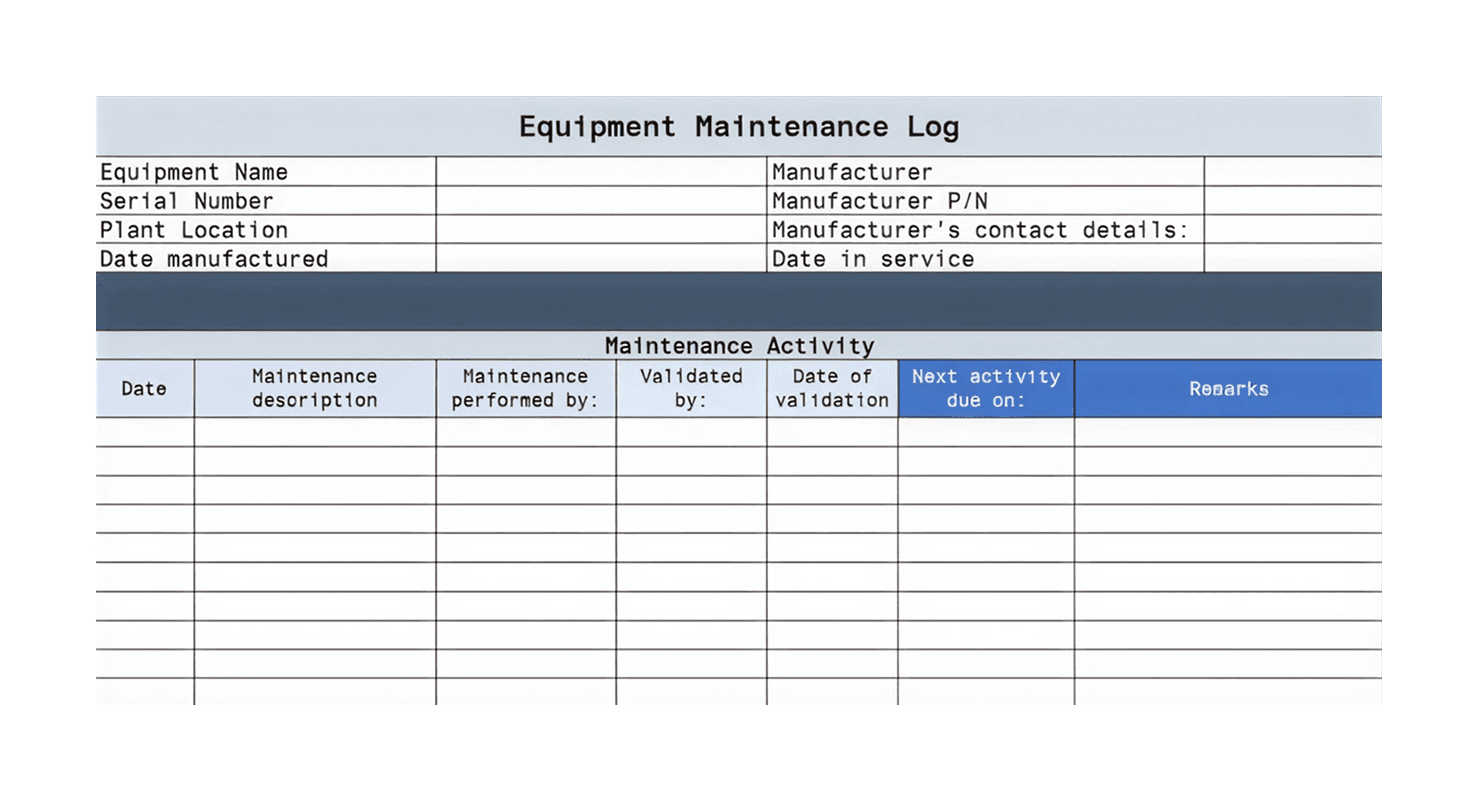
Example of a maintenance log to be filled out manually
Example of a maintenance log to be filled out manually
Example of a maintenance log to be filled out manually
Research
We started with a set of research activities that allowed us to see how teams actually worked day-to-day and what they needed from a digital logbook.
Interviews with the users and managers
Workflow mapping with the product owners team
Review of the sample log entries
Competitive benchmark of enterprise workflow tools
Research
We started with a set of research activities that allowed us to see how teams actually worked day-to-day and what they needed from a digital logbook.
Interviews with the users and managers
Workflow mapping with the product owners team
Review of the sample log entries
Competitive benchmark of enterprise workflow tools
Research
We started with a set of research activities that allowed us to see how teams actually worked day-to-day and what they needed from a digital logbook.
Interviews with the users and managers
Workflow mapping with the product owners team
Review of the sample log entries
Competitive benchmark of enterprise workflow tools
Insights
Because the process was entirely manual, several patterns became clear:
Around 70% of the information written in the paper logbooks was repetitive, which meant a strong opportunity for automation
Different teams recorded different details, but a shared structure was still needed
Field teams relied on their tablets, making mobile-first access critical
Guidance and validation were missing, leading to errors and incomplete records
Managers wanted more consistency without limiting how teams documented their work
These insights shaped the foundation of the digital solution.
Insights
Because the process was entirely manual, several patterns became clear:
Around 70% of the information written in the paper logbooks was repetitive, which meant a strong opportunity for automation
Different teams recorded different details, but a shared structure was still needed
Field teams relied on their tablets, making mobile-first access critical
Guidance and validation were missing, leading to errors and incomplete records
Managers wanted more consistency without limiting how teams documented their work
These insights shaped the foundation of the digital solution.
Insights
Because the process was entirely manual, several patterns became clear:
Around 70% of the information written in the paper logbooks was repetitive, which meant a strong opportunity for automation
Different teams recorded different details, but a shared structure was still needed
Field teams relied on their tablets, making mobile-first access critical
Guidance and validation were missing, leading to errors and incomplete records
Managers wanted more consistency without limiting how teams documented their work
These insights shaped the foundation of the digital solution.
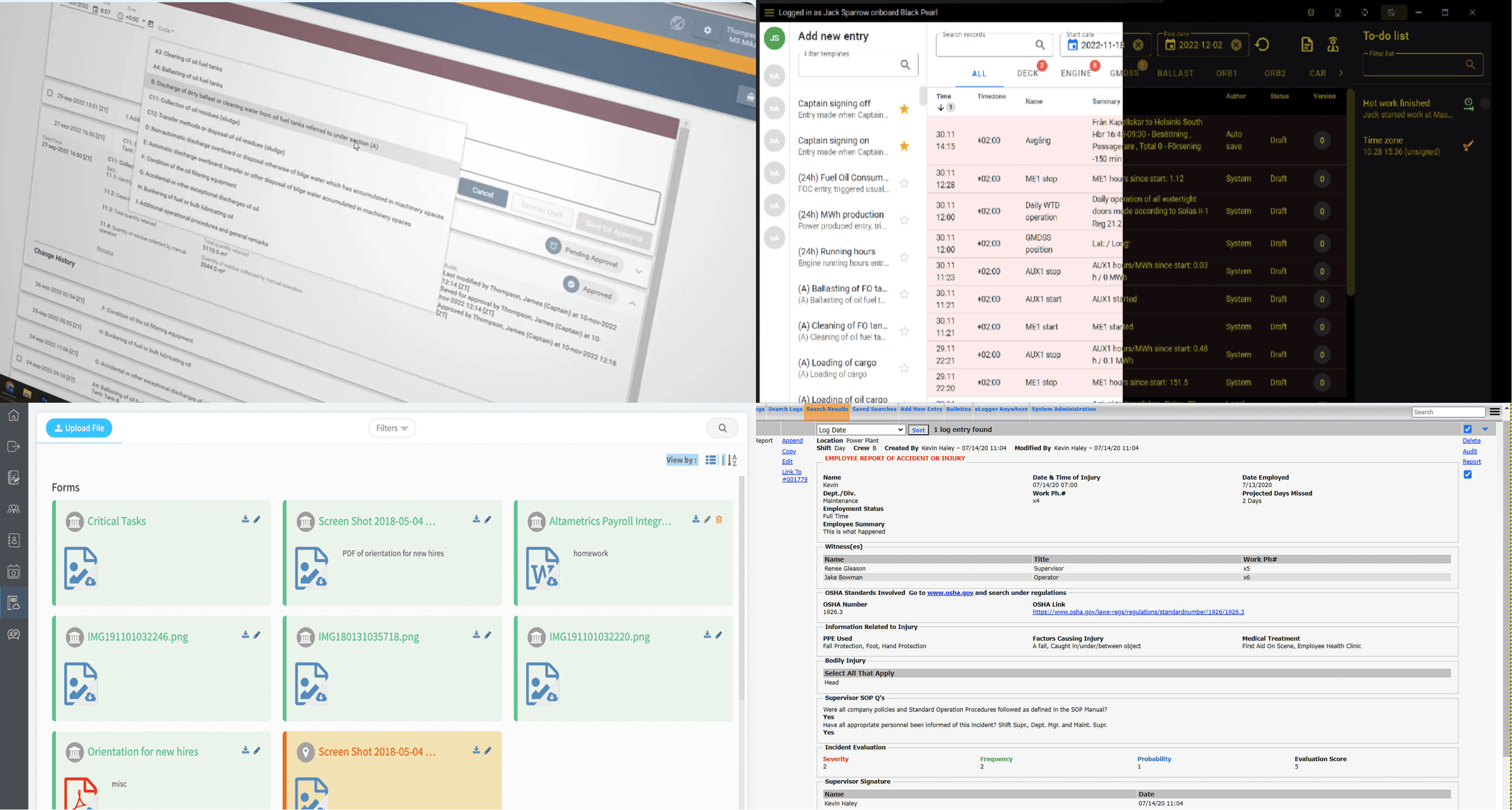
Competitors research and benchmarking example
Competitors research and benchmarking example
Competitors research and benchmarking example
Concept Exploration
We explored two main design directions for the new digital logbook:
a single consolidated form containing all fields, and
a guided step-by-step (wizard-style) flow.
The final concept was built on an existing product page template that we adapted for the logbook needs. We expanded the layout, added new fields, introduced clear indicators for automatic vs. manual entries, and streamlined the structure for faster daily input.
We also designed the interface in both light and dark modes, enabling users to work comfortably in different lighting conditions depending on their location and time of day.
Concept Exploration
We explored two main design directions for the new digital logbook:
a single consolidated form containing all fields, and
a guided step-by-step (wizard-style) flow.
The final concept was built on an existing product page template that we adapted for the logbook needs. We expanded the layout, added new fields, introduced clear indicators for automatic vs. manual entries, and streamlined the structure for faster daily input.
We also designed the interface in both light and dark modes, enabling users to work comfortably in different lighting conditions depending on their location and time of day.
Concept Exploration
We explored two main design directions for the new digital logbook:
a single consolidated form containing all fields, and
a guided step-by-step (wizard-style) flow.
The final concept was built on an existing product page template that we adapted for the logbook needs. We expanded the layout, added new fields, introduced clear indicators for automatic vs. manual entries, and streamlined the structure for faster daily input.
We also designed the interface in both light and dark modes, enabling users to work comfortably in different lighting conditions depending on their location and time of day.
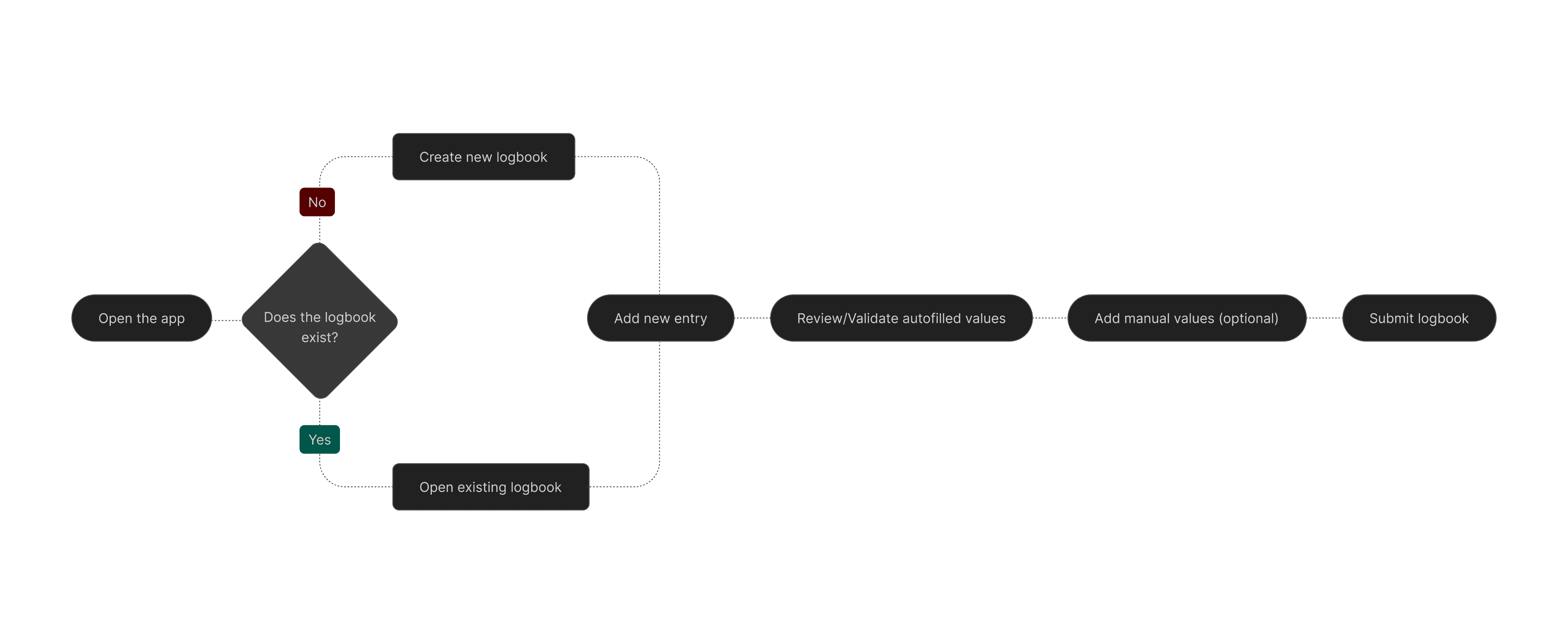
Happy flow
Happy flow
Happy flow
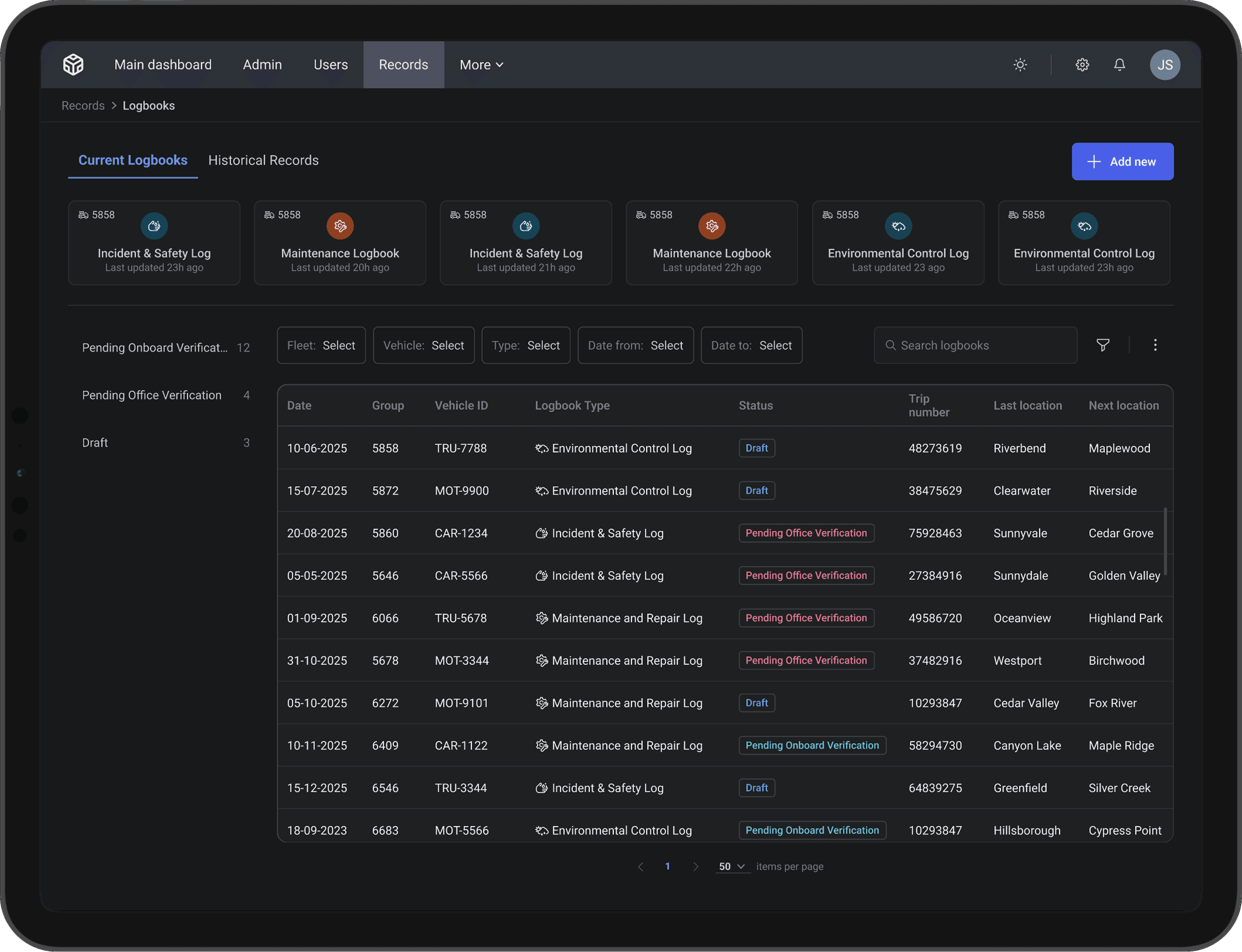
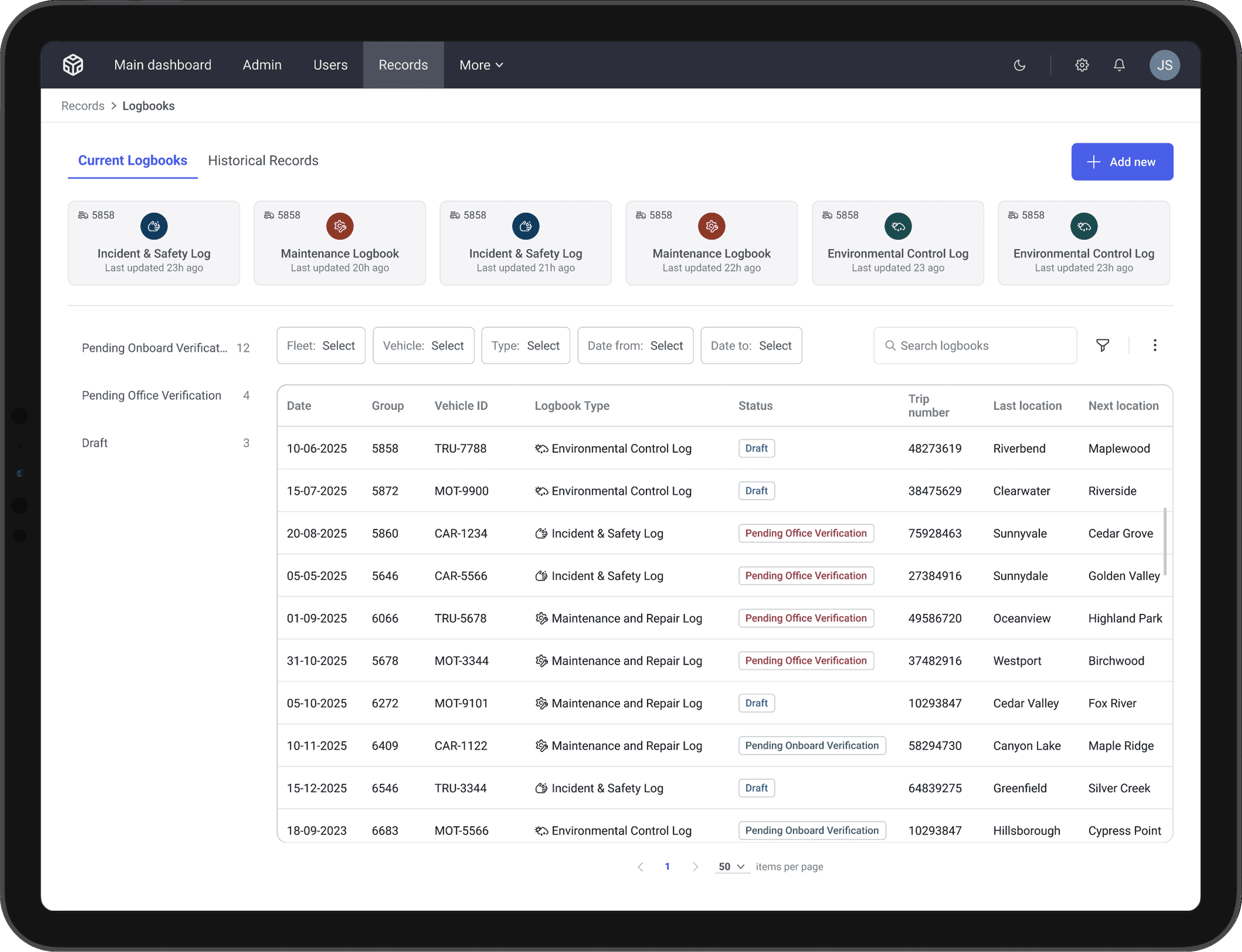
Supporting seamless work in both light and dark environments
Final solution
After validating the concept direction, we refined the interface into a complete digital logbook experience that balanced speed, clarity, and operational accuracy.
The new log entry screen was designed for fast, repeatable daily input while keeping the structure consistent across teams.
Key elements include:
Clear layout hierarchy separating required fields, auto-generated entries, and manual inputs
Indicators for automatic values (system timestamps, user info, recurring defaults) to reduce typing and prevent errors
Smart defaults for fields that rarely change, minimizing repetitive entry
Inline validation to prevent incomplete or non-compliant logs
Mobile-ready layout optimized for field teams working on the go
Autosave so progress is never lost mid-entry
This ensured that logs could be filled out quickly without compromising accuracy or standardization.
Final solution
After validating the concept direction, we refined the interface into a complete digital logbook experience that balanced speed, clarity, and operational accuracy.
The new log entry screen was designed for fast, repeatable daily input while keeping the structure consistent across teams.
Key elements include:
Clear layout hierarchy separating required fields, auto-generated entries, and manual inputs
Indicators for automatic values (system timestamps, user info, recurring defaults) to reduce typing and prevent errors
Smart defaults for fields that rarely change, minimizing repetitive entry
Inline validation to prevent incomplete or non-compliant logs
Mobile-ready layout optimized for field teams working on the go
Autosave so progress is never lost mid-entry
This ensured that logs could be filled out quickly without compromising accuracy or standardization.
Final solution
After validating the concept direction, we refined the interface into a complete digital logbook experience that balanced speed, clarity, and operational accuracy.
The new log entry screen was designed for fast, repeatable daily input while keeping the structure consistent across teams.
Key elements include:
Clear layout hierarchy separating required fields, auto-generated entries, and manual inputs
Indicators for automatic values (system timestamps, user info, recurring defaults) to reduce typing and prevent errors
Smart defaults for fields that rarely change, minimizing repetitive entry
Inline validation to prevent incomplete or non-compliant logs
Mobile-ready layout optimized for field teams working on the go
Autosave so progress is never lost mid-entry
This ensured that logs could be filled out quickly without compromising accuracy or standardization.

Info header collapses on scroll down to allow more screen space for data
Info header collapses on scroll down to allow more screen space for data
Info header collapses on scroll down to allow more screen space for data
Automatic data entry reduced completion time and significantly lowered the rate of manual errors
Automatic data entry reduced completion time and significantly lowered the rate of manual errors
Automatic data entry reduced completion time and significantly lowered the rate of manual errors
Final Solution
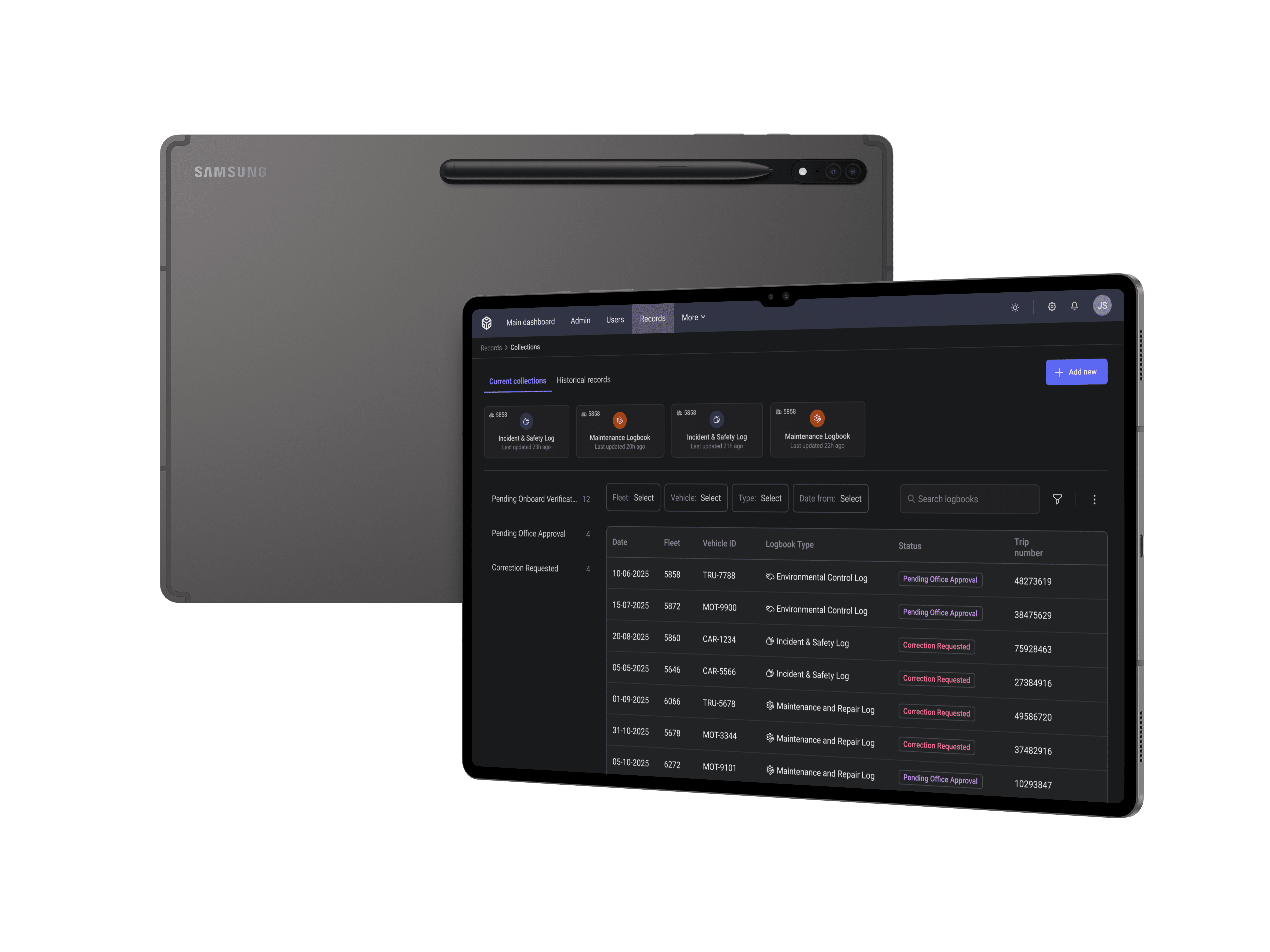
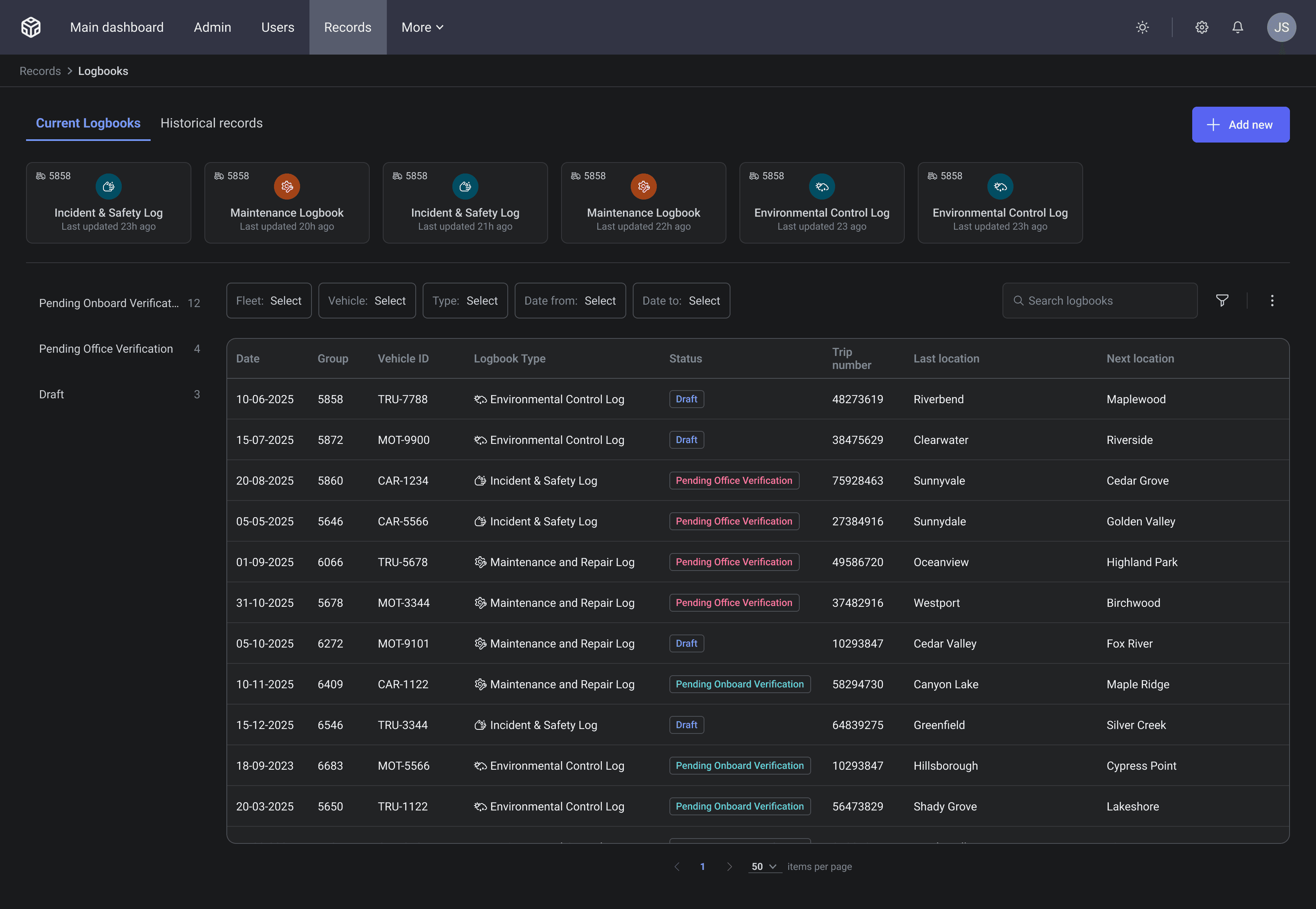
We introduced a new landing page that didn’t exist in the manual workflow. It provides a centralized view of all activity and supports both daily users and managers.
Key capabilities:
Recent logs overview for quick navigation
Status indicators (draft, pending onboard or office verification)
Filters and search to help managers track patterns and prepare for audits
Quick actions for starting a new log or reviewing previous ones
Consistent structuring across teams while still allowing field-level customization
This page serves as the operational “hub” for the logbook system.
Final Solution
We introduced a new landing page that didn’t exist in the manual workflow. It provides a centralized view of all activity and supports both daily users and managers.
Key capabilities:
Recent logs overview for quick navigation
Status indicators (draft, pending onboard or office verification)
Filters and search to help managers track patterns and prepare for audits
Quick actions for starting a new log or reviewing previous ones
Consistent structuring across teams while still allowing field-level customization
This page serves as the operational “hub” for the logbook system.
Final Solution
We introduced a new landing page that didn’t exist in the manual workflow. It provides a centralized view of all activity and supports both daily users and managers.
Key capabilities:
Recent logs overview for quick navigation
Status indicators (draft, pending onboard or office verification)
Filters and search to help managers track patterns and prepare for audits
Quick actions for starting a new log or reviewing previous ones
Consistent structuring across teams while still allowing field-level customization
This page serves as the operational “hub” for the logbook system.
Final Solution
The system now supports a smooth end-to-end workflow:
A team member starts a new log from the Home page
The form loads with smart defaults and auto-generated values.
They complete the required fields with clear guidance and validation.
Logs are saved automatically and submitted with one action.
Managers instantly see new entries, compare logs across dates, and identify missing or inconsistent data.
This cohesive flow replaced fragmented manual processes with a digital system that is faster, more reliable, and easier to oversee.
Final Solution
The system now supports a smooth end-to-end workflow:
A team member starts a new log from the Home page
The form loads with smart defaults and auto-generated values.
They complete the required fields with clear guidance and validation.
Logs are saved automatically and submitted with one action.
Managers instantly see new entries, compare logs across dates, and identify missing or inconsistent data.
This cohesive flow replaced fragmented manual processes with a digital system that is faster, more reliable, and easier to oversee.
Final Solution
The system now supports a smooth end-to-end workflow:
A team member starts a new log from the Home page
The form loads with smart defaults and auto-generated values.
They complete the required fields with clear guidance and validation.
Logs are saved automatically and submitted with one action.
Managers instantly see new entries, compare logs across dates, and identify missing or inconsistent data.
This cohesive flow replaced fragmented manual processes with a digital system that is faster, more reliable, and easier to oversee.
Results & Impact
Although, the feature is still in gradual rollout, early testing of prototypes and alpha versions generated strong qualitative feedback and showed promising improvements across teams.
User & Team Impact
Faster completion time: daily logs were filled considerably faster compared to manual book entries.
Higher accuracy: auto-generated and validated fields reduced common mistakes and missing information.
Lower cognitive load: clear hierarchy and smart defaults reduced repetitive work and decision fatigue.
Organizational Impact
Indicated potential for greater operational reliability, with fewer compliance gaps and more complete records.
Suggested faster audit preparation through filterable digital logs.
Highlighted improved cross-team alignment, as activities were documented in a standardized, comparable way.
Results & Impact
Although, the feature is still in gradual rollout, early testing of prototypes and alpha versions generated strong qualitative feedback and showed promising improvements across teams.
User & Team Impact
Faster completion time: daily logs were filled considerably faster compared to manual book entries.
Higher accuracy: auto-generated and validated fields reduced common mistakes and missing information.
Lower cognitive load: clear hierarchy and smart defaults reduced repetitive work and decision fatigue.
Organizational Impact
Indicated potential for greater operational reliability, with fewer compliance gaps and more complete records.
Suggested faster audit preparation through filterable digital logs.
Highlighted improved cross-team alignment, as activities were documented in a standardized, comparable way.
Results & Impact
Although, the feature is still in gradual rollout, early testing of prototypes and alpha versions generated strong qualitative feedback and showed promising improvements across teams.
User & Team Impact
Faster completion time: daily logs were filled considerably faster compared to manual book entries.
Higher accuracy: auto-generated and validated fields reduced common mistakes and missing information.
Lower cognitive load: clear hierarchy and smart defaults reduced repetitive work and decision fatigue.
Organizational Impact
Indicated potential for greater operational reliability, with fewer compliance gaps and more complete records.
Suggested faster audit preparation through filterable digital logs.
Highlighted improved cross-team alignment, as activities were documented in a standardized, comparable way.
Reflection
This project highlighted several key lessons about designing for operational teams and transitioning from long-standing manual workflows.
What Worked Well
Start with the real-world workflow. Reviewing paper logs clarified what truly mattered.
Design for the 80% use case. By optimizing for recurring and predictable patterns, we gained meaningful speed wins.
Leverage familiarity. Building on an existing page reduced onboarding friction and improved early adoption.
What Was Challenging
Translating manual habits into digital behavior.
What I Would Do Next
Extend version history and management for manager oversight
Introduce templates for recurring activities
Expand offline mode for field-heavy teams
Reflection
This project highlighted several key lessons about designing for operational teams and transitioning from long-standing manual workflows.
What Worked Well
Start with the real-world workflow. Reviewing paper logs clarified what truly mattered.
Design for the 80% use case. By optimizing for recurring and predictable patterns, we gained meaningful speed wins.
Leverage familiarity. Building on an existing page reduced onboarding friction and improved early adoption.
What Was Challenging
Translating manual habits into digital behavior.
What I Would Do Next
Extend version history and management for manager oversight
Introduce templates for recurring activities
Expand offline mode for field-heavy teams
Reflection
This project highlighted several key lessons about designing for operational teams and transitioning from long-standing manual workflows.
What Worked Well
Start with the real-world workflow. Reviewing paper logs clarified what truly mattered.
Design for the 80% use case. By optimizing for recurring and predictable patterns, we gained meaningful speed wins.
Leverage familiarity. Building on an existing page reduced onboarding friction and improved early adoption.
What Was Challenging
Translating manual habits into digital behavior.
What I Would Do Next
Extend version history and management for manager oversight
Introduce templates for recurring activities
Expand offline mode for field-heavy teams
Made with ❤️ In Israel © 2025 Julia Skigar. All rights reserved.
Made with ❤️ In Israel © 2025 Julia Skigar. All rights reserved.
Made with ❤️ In Israel © 2025 Julia Skigar. All rights reserved.